
Chamasoft has a new feature that auto-reconciles all your equity bank transaction alerts.
To enable the feature:
1. Login into Chamasoft.
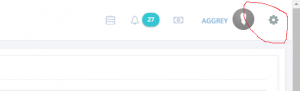
2. Click on the settings icon.
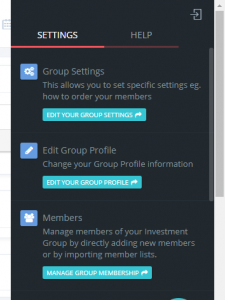
3. Click on Edit Settings.
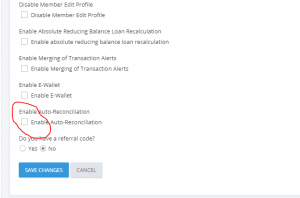
4. Enable Auto-reconcile checkbox and click on save changes.
5. To view alerts auto reconciled click on deposit then click on Auto reconciled deposits.
NB. We get the member to reconcile the alert as per the transaction alert message.
The items to allocate the deposit amount are:
- Contribution.
- Contribution Fine.
- Fines.
Hey Chamaasoft support,
sms gateway is currently down. I nned your support.
Eazzy Club number is 310625
how then should a deposit be made. Are there any specific things to look out for in terms of maybe narrations when banking the money? Where does that leave the inability of the member to influence, say a teller.
Kindly advise on actually the practicallty of this because a member may deposit for different reasons